South Sudan Visa Application Form: How to Fill It Out Step by Step
The South Sudan visa application form is a 10-page online form hosted at evisa.gov.ss that collects your personal details, passport information, travel plans, and background data. You must complete all sections accurately before uploading your supporting documents and paying the fee to submit your application.
If you are planning a trip to South Sudan, understanding the application form in advance saves time and prevents rejection due to errors. This guide walks you through every section of the form, explains what information you need to provide, and highlights common mistakes that delay processing.
For a full overview of the eVisa system, including requirements and fees, see our complete South Sudan eVisa guide.
Where to Access the South Sudan Visa Application Form
The official South Sudan visa application form is available exclusively at evisa.gov.ss. You must create a free account before you can start filling out the form.
The South Sudan government operates its electronic visa system through the official portal. There is no downloadable PDF version of the application form — every applicant must complete the process online. To begin:
- Visit evisa.gov.ss and click “Register” or “Apply Now”
- Enter your email address and create a password
- Confirm your email through the activation link sent to your inbox
- Log in and select “New Application” to start the form
Warning: Avoid third-party websites that claim to offer South Sudan visa application forms. Only evisa.gov.ss is the authorized portal. Using unofficial sites risks data theft or fraudulent visa documents.
Sections of the South Sudan Visa Application Form
The application form spans 10 pages covering personal information, passport details, travel plans, employment history, and background questions. Each page must be completed before you can advance to the next.
Below is a breakdown of every section you will encounter when filling out the form.
Section 1: Personal Information
The first section collects your basic identity details:
| Field | What to Enter | Notes |
|---|---|---|
| Full Name | As it appears on your passport | Include all given names and surnames |
| Date of Birth | DD/MM/YYYY format | Must match passport exactly |
| Nationality | Select from dropdown | Determines visa eligibility |
| Gender | Male / Female | As stated on passport |
| Place of Birth | City and country | Match passport details |
| Marital Status | Single / Married / Other | Select applicable option |
Tip: Double-check that every name and date matches your passport exactly. Discrepancies between the form and your passport are the most common reason for visa delays.
Section 2: Passport Details
This section requires your passport information:
- Passport Number — Enter the alphanumeric code from your passport’s data page
- Date of Issue — When your passport was issued
- Date of Expiry — Your passport must be valid for at least 6 months from your planned arrival date
- Issuing Country — The country that issued your passport
- Passport Type — Ordinary, Diplomatic, or Official
Your passport must have at least 6 blank pages for entry stamps. If your passport is close to expiry or lacks blank pages, renew it before starting the application.
Section 3: Travel Information
Here you provide details about your trip to South Sudan:
| Field | What to Enter | Notes |
|---|---|---|
| Visa Type | Tourist, Business, Work, Student, or Transit | Choose based on your purpose of travel |
| Entry Type | Single or Multiple | Single-entry is standard for tourists |
| Arrival Date | DD/MM/YYYY | Must be within 7 days of submission |
| Port of Entry | Juba International Airport, Nadapal, Kaya, Nimule, Majok Nyin Thiou, or Renk | Select your planned entry point |
| Accommodation | Hotel name and address, or host details | Required for all applicants |
The 7-day arrival window is a strict requirement. You cannot submit the form if your intended arrival date is more than 7 days from the application date. Plan your timeline accordingly.
Section 4: Accommodation Details
Provide your planned accommodation in South Sudan:
- Hotel Name and Address — If staying at a hotel, enter the full name and address
- Host Name and Contact — If staying with a person or organization, provide their full name, phone number, and address in South Sudan
- City of Stay — Juba is the most common, but enter your actual destination
For business and work visa applicants, your host company typically provides this information in the letter of invitation.
Section 5: Employment Details
This section asks about your current occupation:
- Employment Status — Employed, Self-Employed, Unemployed, Student, or Retired
- Employer Name — Your company or organization name
- Job Title — Your current position
- Employer Address — Full business address
- Employer Phone — Contact number for your employer
If you are self-employed, enter your business name and address. Students should enter their school or university details.
Section 6: Travel History
The form asks about your previous travel:
- Countries visited in the last 5 years — Select from a dropdown list
- Previous South Sudan visas — If you have visited before, provide visa numbers and dates
- Previous visa denials — You must disclose any visa rejections from any country
Answer honestly. South Sudan immigration authorities cross-reference your answers with international databases. Providing false information can result in a permanent ban.
Section 7: Background Questions
The final content section includes security and background questions:
- Have you ever been refused entry to any country?
- Have you ever been deported from any country?
- Do you have any criminal convictions?
- Have you ever been involved in espionage or terrorism?
- Do you have any communicable diseases?
Answer each question truthfully. A “Yes” answer does not automatically disqualify you, but dishonesty will result in refusal if discovered.
Documents to Prepare Before Starting the Form
Before opening the application form, gather all your documents and scan them. Each file must be 293KB or smaller in JPG, PNG, or PDF format.
Having everything ready prevents the form from timing out while you search for files. You will need:
| Document | Format | Max Size | Required For |
|---|---|---|---|
| Passport Data Page Scan | JPG, PNG, or PDF | 293KB | All applicants |
| Passport Photo | JPG or PNG | 293KB | All applicants |
| Yellow Fever Certificate | JPG, PNG, or PDF | 293KB | All applicants |
| Hotel Reservation | JPG, PNG, or PDF | 293KB | Tourist visa |
| Letter of Invitation | JPG, PNG, or PDF | 293KB | Business, Work, Student |
| Return Flight Booking | JPG, PNG, or PDF | 293KB | Tourist visa |
For the complete list of all required documents, see our South Sudan eVisa requirements guide.
How to Fill Out the Form Without Errors
The most common mistakes on the South Sudan visa application form are mismatched names, incorrect passport numbers, and uploading files over 293KB. Triple-check every field before clicking Submit.
Follow these tips to avoid rejection:
- Match your passport exactly — Use the same spelling, order of names, and dates as your passport data page. Even a single missing middle name can cause problems.
- Check file sizes before uploading — Compress any files over 293KB using an online tool or image editor before you begin. The portal will reject oversized files without a clear error message.
- Save your progress — The form does not auto-save. If your session expires, you may lose entered data. Complete the form in one sitting if possible.
- Use a stable internet connection — A dropped connection during submission can corrupt your application. Avoid mobile data or public Wi-Fi.
- Enter dates in the correct format — The form uses DD/MM/YYYY. Entering dates in MM/DD/YYYY format is a common error that leads to wrong travel dates on the visa.
What Happens After You Submit the Form
After submitting the form, you pay the visa fee by credit card, then wait 3-7 business days for a decision. You can track your application status by logging into your evisa.gov.ss account.
The post-submission process:
- Payment — The system redirects you to a secure payment page. Enter your credit card details and confirm the transaction. The fee depends on your visa type. See our South Sudan eVisa fee breakdown for exact amounts.
- Confirmation Email — You receive an email confirming your submission and payment.
- Processing — Most applications are processed within 3-7 business days. During peak travel seasons, processing may take longer.
- Decision — You receive an email notification when a decision is made. Log in to your account to download your approved eVisa.
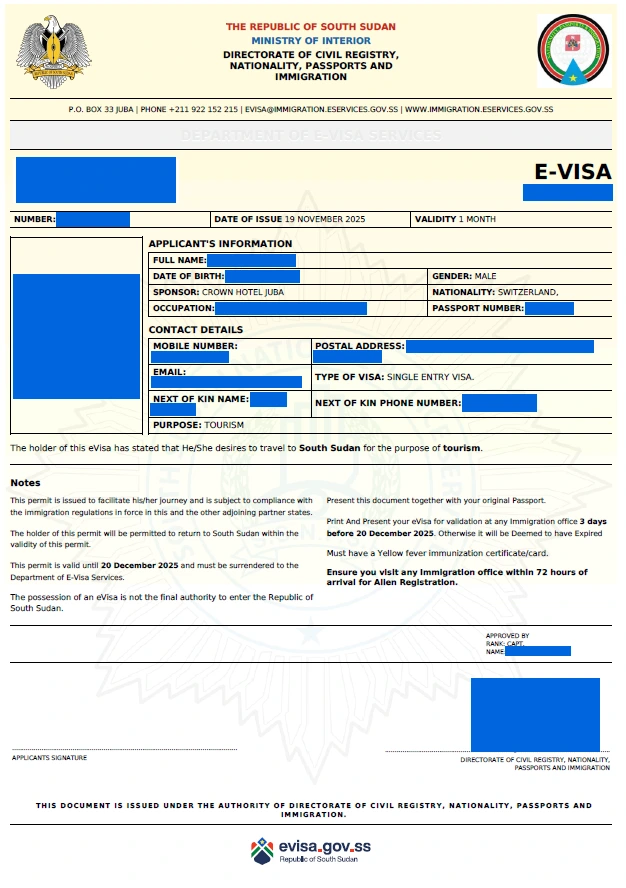
- Print Your eVisa — Print the eVisa document and carry it with your passport when traveling to South Sudan.
If additional documents are requested, you will receive an email with instructions. Respond promptly to avoid further delays.
South Sudan Embassy Visa Application Form
If you prefer to apply through a South Sudanese embassy instead of online, you can obtain a paper application form at the nearest diplomatic mission. Embassy applications cost $50 but require an in-person visit.
The embassy application process differs from the eVisa:
| Feature | eVisa (Online) | Embassy Application |
|---|---|---|
| Application Method | Online at evisa.gov.ss | Paper form at embassy |
| Fee | $100-$120 | $50 |
| Processing Time | 3-7 business days | Varies by embassy |
| In-Person Visit | Not required | Required |
| Document Upload | Digital files | Physical copies |
| Payment | Credit card | Cash or money order |
Embassy applications are recommended for travelers who live near a South Sudanese diplomatic mission or who need a visa type not available through the eVisa system.
Frequently Asked Questions
Can I save the South Sudan visa application form and finish it later?
The evisa.gov.ss portal does not offer a save-and-resume feature. You should complete the entire form in one session. Prepare all documents and information before you begin to avoid losing progress.
What file formats are accepted for document uploads?
The portal accepts JPG, PNG, and PDF files. Each file must be 293KB or smaller. If your scans exceed this limit, use an online compression tool or resize the image before uploading.
Can I edit my application after submitting it?
Once submitted, you cannot edit your application. If you discover an error after submission, contact the South Sudan immigration authorities through the evisa.gov.ss portal or wait for a response that may request clarification.
Do I need to print the application form?
No, you do not need to print the application form itself. However, you must print the approved eVisa document and carry it with your passport when traveling to South Sudan.
What if my passport name does not match my application name?
Any discrepancy between your passport and your application can cause delays or rejection. Ensure every name, date, and number matches your passport exactly before submitting.
Is the South Sudan visa application form available in other languages?
The evisa.gov.ss portal is available in English only. If you are not fluent in English, consider having someone assist you with the form to ensure all entries are accurate.
How long does the application form take to complete?
Most applicants complete the form in 20-30 minutes if they have all documents prepared. Uploading compressed files and entering data carefully adds time but reduces the risk of errors.